If you’re considering upgrading your business video conferencing facilities, you’ll have quickly noticed that there is no shortage of appropriate Microsoft Teams Rooms equipment to choose from. Countless brands, including major players Yealink, Poly, MAXHUB and Logitech (or Logi), all offer these types of solutions, designed to transform your run-of-the-mill meeting room into a professional space for hybrid meetings.
While having plenty of choice is certainly a good thing, it can also make it harder to know that you’re investing in kit that will last or even kit that will fit your meeting space and requirements. Do you need an all-in-one meeting bar or a more flexible, modular setup? Would a Windows-based Teams Room be better for your business, or is an Android solution more suitable? And, perhaps most importantly, which Teams Rooms manufacturer offers the right combination of video quality, audio and ease of use for your teams and meeting spaces?
These are all questions that you’ll need to consider as you invest in a Microsoft Teams Room, and they’re decisions we’ve been helping businesses across the country make as we assist with the entire process of specifying, installing and using a Teams Room video conferencing solution. With that in mind, the Agile Comms team has put together this short comparison guide to the different devices you’ll likely be exploring so that you can find the right fit.
What Is A Microsoft Teams Room?
Before comparing the different manufacturers, it’s worth clarifying exactly what we mean by a Teams Room.
A Microsoft Teams Room is essentially a meeting room that has been equipped with dedicated video conferencing technology designed to work seamlessly with Microsoft Teams. Rather than somebody bringing a laptop into the meeting room, opening Teams and then spending ten minutes trying to connect the camera, share their screen and get the meeting started, everything they need to do so is already there and installed.
The idea is simple: walk into the room, tap the meeting you want to join and get started. Of course, the technology behind this can vary considerably depending on the manufacturer and the size and purpose of the room.
Yealink vs Poly vs MAXHUB vs Logitech
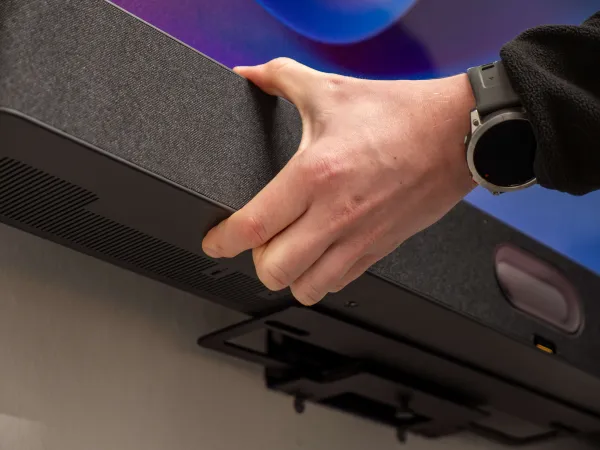
There are four dominant manufacturers in the Teams Rooms solution space: Yealink, Poly, MAXHUB and Logitech. Naturally, each has different strengths, and it’s useful to think about which one is best suited to your particular meeting room and ways of working, rather than which simply has the most eye-catching features.
Yealink Teams Rooms
Best for: creating a comprehensive and scalable Teams Rooms environment
We’ve talked extensively about the Yealink Teams Rooms range here at Agile Comms, and for good reason. Yealink Teams Rooms offer a huge amount of flexibility, with solutions designed for everything from compact huddle rooms to large boardrooms and more complex spaces.
One of the main advantages of Yealink is the breadth of its video conferencing range. You can opt for an all-in-one meeting bar for smaller rooms but quickly pivot to an MVC system in bigger rooms where additional cameras, microphones and speakers are required. They’ve even got innovations like the MeetingBoard Pro, a dynamic, whiteboard-style device for meetings in open and dynamic spaces.
Yealink also puts a huge amount of emphasis on innovation and AI-powered video and audio. Intelligent framing, speaker tracking, IntelliFocus and Video Fence technology make meetings more natural for remote participants, while advanced noise cancellation ensures that everyone can be heard clearly.
We particularly like the fact that the Yealink Teams Rooms range can grow as your teams do. A small meeting room doesn’t need the same technology as a 30-person boardroom, and Yealink makes it possible to create a consistent video conferencing experience across different spaces without specifying the same equipment for each room.
Poly
Best for: premium audio and video performance
Poly, now part of HP, is another of the most commonly found Teams Rooms solutions in hybrid workplaces. This Teams Rooms offering is particularly strong when it comes to professional audio and video, with a range of solutions available depending on meeting room size and requirements.
One of the key differences with Poly is its modular approach. Its Studio Base Kit provides the core Microsoft Teams Rooms computer and touch controller, which can then be combined with different Poly cameras and video bars depending on the room.
Poly’s DirectorAI technology is another major selling point, automatically helping to frame participants and speakers. Technologies such as NoiseBlockAI and Acoustic Fence then tackle unwanted background noise.
The modular nature of Poly Teams Rooms combined with its features makes them a particularly interesting option for organisations where the quality of a meeting experience is the priority and where a more bespoke system is required. The trade-off is that a modular system can require more planning and is potentially liable to user error or inconsistencies, which could undermine the technology’s capabilities.
MAXHUB
Best for: businesses looking for a low-cost route into Teams Rooms
MAXHUB is perhaps the least widely known name on this list, but is nonetheless a manufacturer worth paying attention to if you’re carefully considering your Teams Rooms options.
Its XT Series has been designed specifically for Microsoft Teams Rooms and takes an interesting approach to businesses looking to move away from traditional laptop-based BYOD meeting setups. The series gives you the freedom to invest in as much or as little technology as is necessary for your teams’ needs. The XT10-VB, for example, combines a Windows computer with a touch console and video bar, creating a dedicated Teams Room setup without silly amounts of kit.
If you’re looking to standardise several meeting rooms while keeping a close eye on budgets, MAXHUB is certainly worth considering. As a relatively new face in the market, we’ll certainly be keeping a close eye on what they release next and helping our clients access and benefit from it if we think it’s a good fit.
Logitech
Best for: businesses looking for a familiar and straightforward Teams Rooms setup
Logitech is one of the most recognisable names in this Teams Rooms comparison, with its well-established Rally range being one of the most common bits of kit seen in meeting rooms designed for video conferencing.
The Rally Bar, for example, combines a camera, microphone and speakers into a single device and can run Teams Rooms on both Android and Windows. For a straightforward meeting room, this setup is a real advantage. You don’t necessarily need a complicated selection of separate devices, and Logitech’s Sync platform also provides centralised management for multiple rooms.
However, the simplicity of Logitech Teams Rooms can become a limitation when your requirements become more demanding. What looks like a simple solution can quickly become more involved when trying to adapt it to a room that doesn’t fit the standard configuration.
None of this makes Logitech a bad choice. For a relatively conventional meeting room, it’s a pretty solid plug-and-play solution. However, if you’re investing in a Teams Room that needs to do more, we’d recommend looking beyond it to avoid experiencing the technical headaches you’re trying to prevent.
Which Teams Room Is Right For You?
It’s clear that there’s no one-size-fits-all answer when it comes to choosing a Teams Room. The right solution depends heavily on the size and layout of your room and who is using it. The key is therefore to choose a Teams Room that suits the room rather than trying to make the room work around the technology.
Professional installation can make all the difference, too. It’s all well and good getting sophisticated cameras, microphones, speakers, and displays, but positioning and configuring them properly, and ensuring staff can actually use them properly, is what makes a Teams Room a genuinely valuable investment.
This is where we can come in. At Agile Comms, we’ve got loads of experience in every step of the Microsoft Teams Rooms installation process. From specifying kit that suits your space and requirements to fitting it neatly and correctly, we can help you find and enjoy a video conferencing solution that works for your organisation. We’ll take the time to understand how you operate and recommend a setup that gives you the functionality you need without paying for technology you don’t need. Based on our current clients, this will often be a Yealink Teams Room, but it won’t always be, and we’re always on hand to help with bespoke requirements.
To discuss your Teams Rooms requirements with us further, please get in touch today.

Get in touch
Book a demo or an introductory call to kickstart the process of upgrading with Agile Comms. Enter your details in the form and our trusted experts will be in touch.