Gone are the days of every company operating exclusively from its own office or premises. Rising property costs, more flexible working arrangements and the growth of co-working spaces mean that businesses are increasingly sharing workspaces or using different locations from day to day.
When teams are working across multiple locations or meeting outside their usual office, reliable video conferencing becomes absolutely essential. They need to be able to maintain professionalism, seamlessly joining meetings wherever they’re working and collaborating without worrying whether the technology can hold up in the space they’re using.
Microsoft Teams Rooms offer the perfect solution, but there’s a little more to consider when choosing one for a shared workspace compared to a typical office meeting room. In particular, how Microsoft handles different users and accounts can make a difference to how easily a meeting can be accessed. There are also solutions that offer flexibility beyond a fixed meeting room, including all-in-one meeting boards that are great for client pitches and presentations.
We’ve broken this down in more detail in this guide, outlining the key considerations for choosing a video conferencing solution for a shared workspace and our suggestions for solutions worth considering.
What Is A Microsoft Teams Room?
Most of us are pretty familiar with Microsoft Teams Rooms by now, with these video conferencing solutions becoming a mainstay in meeting spaces as hybrid working has really taken off. However, it’s worth us just recapping exactly what a Teams Room offers before we talk about how this technology can apply to shared workspaces.
A Microsoft Teams Room is essentially a video conferencing setup that brings everything a video meeting needs together in one place. Rather than someone joining through their laptop, a Teams Room includes an integrated display, camera, microphones, speakers and control panel that allows users to join meetings and share content from the room itself.
The general idea is to make video meetings feel as straightforward as meeting in person. Your teams can simply walk into a room, join a scheduled call and share your screen without having to spend the first few minutes awkwardly battling with technology to get it to work.
What Makes A Good Shared Workspace Teams Room?
For a traditional office, a Teams Room is pretty straightforward to set up. The room is configured for one business, its employees and its Microsoft 365 environment. In a co-working space or multi-use office, however, the same equipment might be used by people from different offices or departments, each with their own accounts and meeting arrangements.
This means that a good video conferencing solution needs to:
- Offer the ability to join calls without complicated sign-in processes or setup
- Accommodate a variety of ways businesses and teams may use Microsoft Teams
- Deliver clear sound and picture quality at all times
- Allow for seamless content sharing without struggling with connections or compatibility
- Suit a variety of meeting formats, from small team discussions to larger presentations and collaborative sessions
Teams Rooms Requirements For Shared Workspaces
One of the biggest differences between a Teams Room in a traditional office and one in a shared workspace is how users access the system.
Most conventional Microsoft Teams Rooms are configured with a dedicated resource account. In short, this is a Microsoft 365 account, such as meetingroom@yourorganisation, rather than an individual employee. This means that the room system can sign in, access its calendar and join scheduled meetings.
For a business using its own meeting rooms, this process is seamless. Employees can book the room through their organisation’s calendar and invite it to meetings as needed.
However, things become more complicated when a space is shared by several businesses. If the equipment is configured around one organisation’s Microsoft 365 account, people from other organisations may need to use alternative ways of joining meetings or sharing content. This doesn’t mean that only one business can use the room. There are different ways for external users to join Teams meetings, including guest access and connecting their own devices. However, it’s important to understand how these options work before choosing a system.
It’s also important to consider that meetings might not always take place in the same space, so a fixed solution in a specific room often isn’t the most effective approach. For shared workspaces, the ideal setup is one that makes it easy for different users to access the meetings they need wherever they might need to hold them, without having to navigate unnecessary account restrictions or rely on the workspace provider to manage every call.
Our Chosen Solutions
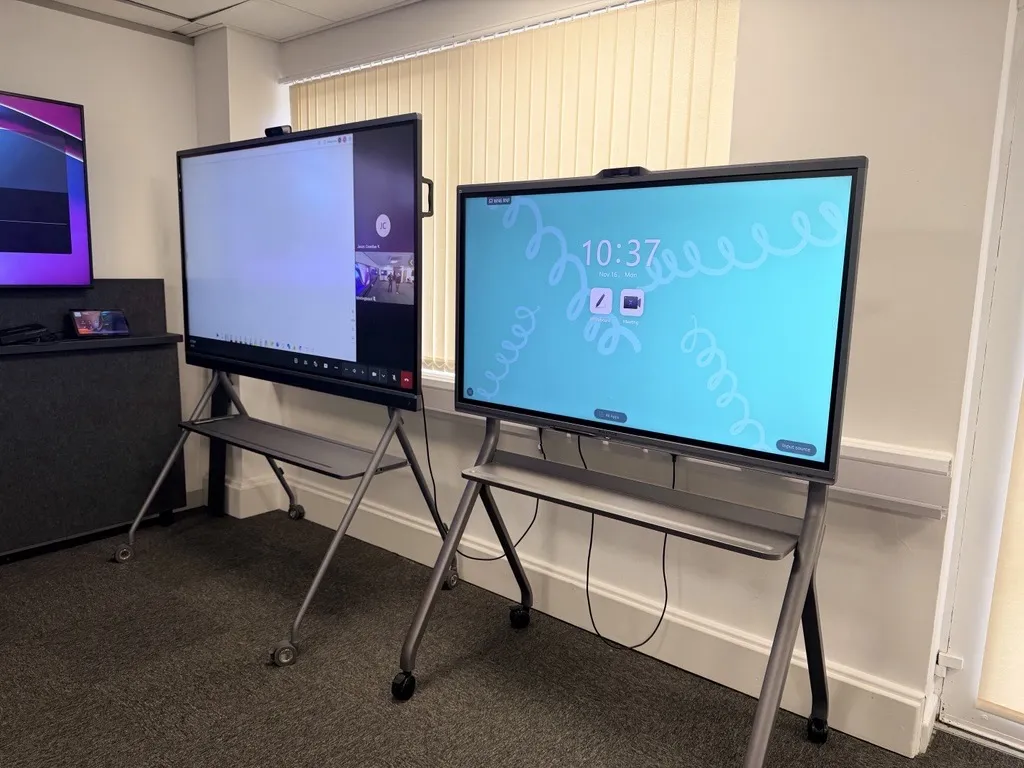
There are several video conferencing solutions available that meet the nuanced requirements of shared workspaces really well. It’s absolutely possible to have a fixed setup (and please speak to us for more guidance if this is the case), but we find that all-in-one collaboration displays are a great option for shared spaces. These bring the main components of a good meeting together while offering critical flexibility and portability.
Two solutions especially worth considering are:
Yealink MeetingBoard Pro
The Yealink MeetingBoard Pro is an all-in-one collaboration display that brings video conferencing and interactive working together with a large touchscreen, integrated camera, microphones, and speakers. This means there’s no requirement to install lots of separate equipment around the room, which can be a game-changer when a space is used for a variety of tasks.
As well as supporting video meetings, the MeetingBoard Pro includes digital whiteboarding capabilities, allowing people to annotate documents, make notes and work through ideas together during a meeting. This makes it useful for more than simply joining video calls, particularly in shared spaces where rooms need to accommodate different types of collaboration.
MAXHUB XBoard
The MAXHUB XBoard Interactive solutions are also a great option for businesses operating across multi-use spaces, tying together the display and conferencing technology needed to run meetings.
As with the MeetingBoard Pro, the appeal here is having the key components in one portable package. Integrated audio and video capabilities reduce the need for separate equipment, while the interactive display provides a central point for presentations and information sharing.
What particularly makes MAXHUB XBoard products stand out in shared workspaces is the fact that they make it really easy for different users to access the system in different ways. These systems aren’t a Teams Room, so they aren’t tied to one email address or domain. This makes them perfect when not everyone is working within one Microsoft environment.
Unlike regular Teams Room solutions, the MaxHub can provide a slicker, more versatile service to staff from multiple organisations, with quick logins to various meeting platforms (Teams, Zoom, Google, Webex) and a range of flexible content sharing options.
The beauty of these portable, all-in-one solutions is that they aren’t limited to shared offices and permanent meeting spaces. We’re seeing more and more of our clients investing in this type of technology to give their teams more flexibility when working away from their usual premises.
For example, sales teams and client-facing employees can deliver pitches and talk through product features with a meeting board that they can take to different locations. With an integrated display, camera, microphones and speakers, they can present information to people in the room while bringing remote colleagues or stakeholders into the discussion. Touchscreen and whiteboarding features also make it easier to annotate information, develop ideas and work through proposals with clients.
Find Your Ideal Video Conferencing Solution
The important thing to remember is that video conferencing hardware can be remarkably flexible, giving you the ability to host professional meetings even in unconventional settings.
If you’d like to explore solutions for shared workspaces in more detail, please get in touch with our expert team, who can provide a recommendation based on your exact requirements and get started on a seamless installation and setup process.

Get in touch
Book a demo or an introductory call to kickstart the process of upgrading with Agile Comms. Enter your details in the form and our trusted experts will be in touch.