

Kitting out a huddle room is a tricky balancing act. For years, these smaller meeting spaces have been left pretty bare and used as quick-use areas where employees might take a quick call or huddle together around a laptop. However, as more and more of us hold our meetings via video and with remote participants, the way these spaces can be used has shifted rapidly. The need for your meeting room to enable effective video meetings is greater than ever, and this is where a tailored approach to huddle room video conferencing can make or break the experience of both you and your clients and meeting participants.
What Is A Huddle Room?
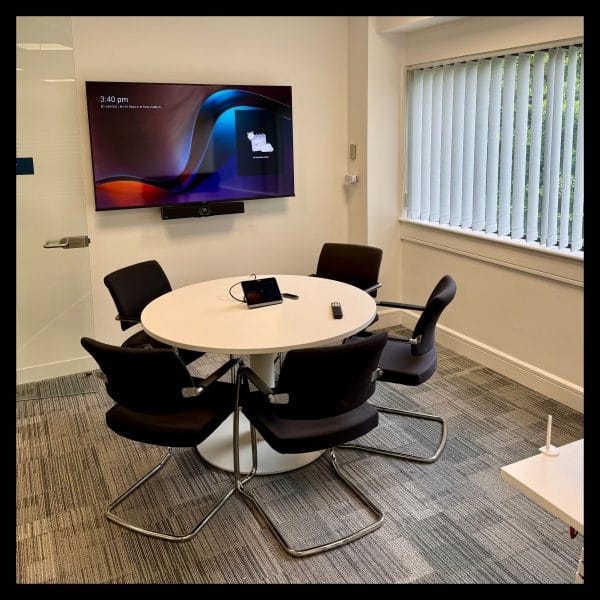
A huddle room is a small and often informal meeting space that is designed for quick collaboration. These types of rooms typically seat 2 to 6 meeting participants, aiding focused chats, brainstorming, and check-ins with a combination of in-person and remote participants.
Many of our clients have had a meeting space like this for years but treated it almost like a spare room. However, we’re seeing more and more that huddle spaces are becoming totally indispensable as they are:
- An efficient use of space, turning unused corners of the office into dedicated and productive areas.
- Great for natural and quick collaboration in moments where the main boardroom is unnecessary or unavailable.
- Less expensive to kit out than larger meeting rooms.
- Easy to maintain and manage.
- Supportive of hybrid working arrangements, where some members of the team may be working remotely.
Huddle Room Video Conferencing Options
With clear benefits available to those who have a huddle space within their office(s), the next step is to decide how best to optimise the room for video conferencing.
When it comes to huddle room video conferencing, you could all crowd around a laptop or hook up to a shared screen and make it through the meeting. However, if you consider the perspective of the client dialling in, things change a little. They might struggle to hear you properly, someone might be halfway out of the frame, and then there’s the poor quality of a built-in webcam to contend with. This approach isn’t a great look for your business.
To get the most out of your huddle room, it’s worth investing in a proper video conferencing solution and the right combination of camera, microphone, speakers, and screen. There are even some fantastic all-in-one devices that help you keep things as simple as they should be.
What To Look For In Your Huddle Room Technology
To make the most of the potential of your huddle room, you don’t need to go overboard with flashy and expensive kit. However, there are a few key things to look for when picking your set-up:
1. Space-Specific Design
The beauty of a huddle room is that it is compact and fuss-free by nature. You obviously have less space to work with compared to a typical meeting room, so the technology you do pick needs to be streamlined and make the most of the space that is available. All-in-one huddle room video conferencing solutions come into their own in this regard, with a high-quality camera, microphone and speakers all packed into one powerful device.
We’ve found that the Yealink A10 Meeting Bar works particularly well for our clients with rooms of up to 5 seats, delivering a compact and streamlined video conferencing experience without sacrificing quality.
2. Platform Compatibility
Your huddle room video conferencing solution needs to work seamlessly with the tools your teams already use. Trying to add another system or platform into the mix is a surefire way to create some technical hiccups and limit how much the huddle room technology actually gets used.
Whether your business uses Microsoft Teams, Zoom, or Google Meet, there are options available which will integrate seamlessly. For example, if you opt for a Microsoft Teams Room solution, you’ll get that familiar Teams experience the second you start the meeting with one-touch join, automatic calendar syncing, and familiar in-meeting controls. At Agile Comms, we can always help with this and specify hardware that works exactly how your team does.
3. Audio & Video Quality
The size constraints of a huddle room can be a blessing and a curse when it comes to audio and video quality. On the one hand, you’ll probably be closer to the camera which helps when it comes to creating that real-life and interactive visual feel. However, in a small room, bad sound can feel really bad and investing in quality can make all the difference.
The best huddle room video conferencing solutions, including the Yealink devices we typically specify and install, are packed with features that can overcome these quality issues. Technical details like AI-enhanced audio, noise suppression, and smart cameras, which help remote participants feel like they’re actually in the room and valued.
4. Ease Of Use
We’ve already touched upon the fact that your team are much more likely to use a huddle room video conferencing solution if it matches with existing expectations and platforms. It’s also true that the simpler the system, the more it will be used. Nobody wants to be messing around for ages with wires and cables five minutes before the call – they just want to walk into the room, hit a button, and start the meeting.
There are some great video conferencing devices which allow you to create a space that is easy to use. Devices like the Yealink A40 have a central console which can be used to manage the meeting, launch screen sharing and check the room calendar all in one place. It’s this kind of intuitive and efficient technology that will really help to make the most of your space and take the pressure off the meeting host. You can also count on us to install your chosen device in a neat and tidy manner, with no loose cables to get in the way and confuse things.
Upgrade Your Huddle Room With Agile Comms
At Agile Comms, we’re experienced in helping businesses hold more effective video meetings, no matter the size of their meeting space. If you want to upgrade a smaller space and create the optimal huddle room video conferencing experience, we can help. We’ll work with you to understand how your rooms are used, recommend the right solution, and then install it to support seamless and stress-free meetings.
Whether the answer is an all-in-one Yealink device, a full Microsoft Teams Room setup, or something totally bespoke, you can count on us to find a huddle room video conferencing solution that works for you and your team. Get in touch today to discuss your requirements and receive a free quote.


